Saving and deleting queries
Saving queries enables you to reload and use them in the future. To do this,
click on the icon
 to the right on the query bar. This
will bring up a window in which we give the query a name and then
click the button
to the right on the query bar. This
will bring up a window in which we give the query a name and then
click the button  .
.

Saved queries can be opened by going to „Settings” from the main menu at the top of the page, then from the submenu select „Object” and finally the „Searches” tab.
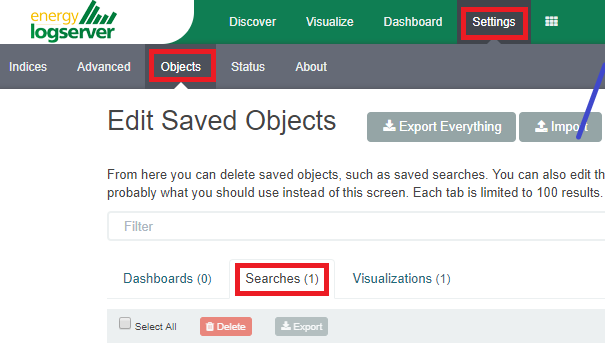
To open a saved query in the search window, you can click on the icon
 to the right of the query you are interested in.
After clicking on the icon
to the right of the query you are interested in.
After clicking on the icon
 or the name of the saved query, we
will gain access to the advanced editing mode, so that we can change
the query on at a lower level. It is a powerful tool designed for
advanced users, designed to modify the query and the way it is
presented by Energy Log Server.
or the name of the saved query, we
will gain access to the advanced editing mode, so that we can change
the query on at a lower level. It is a powerful tool designed for
advanced users, designed to modify the query and the way it is
presented by Energy Log Server.
To delete a saved query, select it in the list (the icon
 to the left of the query name), and
then click
to the left of the query name), and
then click . In this way, you can delete many
saved queries simultaneously.
. In this way, you can delete many
saved queries simultaneously.
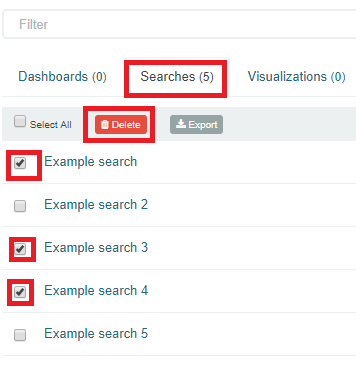
From this level, you can also export saved queries in the same way. To
do this, you need to click on
 and choose the save location. The file
will be saved in .JSON format. If you then want to import such a file to
Energy Log Server, click on button
and choose the save location. The file
will be saved in .JSON format. If you then want to import such a file to
Energy Log Server, click on button
 , at the top of the page and select the
desired file.
, at the top of the page and select the
desired file.